Merging sorted lists
21. Merge Two Sorted Lists (EASY)
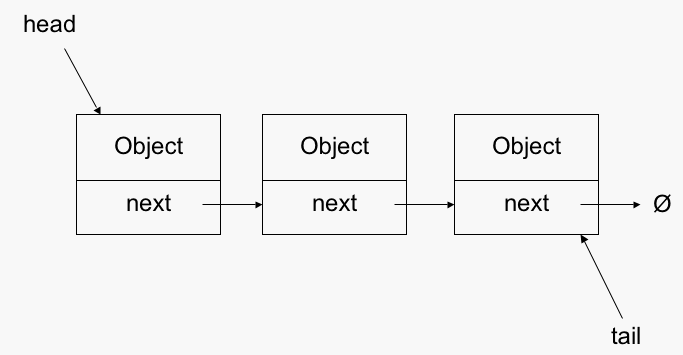
#this image is from the net not given in question
You are given the heads of two sorted linked lists list1 and list2.
Merge the two lists in a one sorted list. The list should be made by splicing together the nodes of the first two lists.
Return the head of the merged linked list.
Example 1:
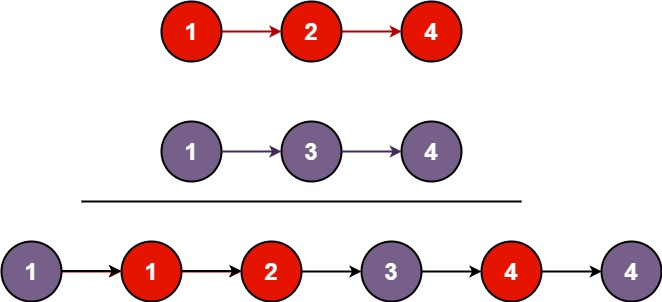
Input: list1 = [1,2,4], list2 = [1,3,4]
Output: [1,1,2,3,4,4]
Example 2:
Input: list1 = [], list2 = []
Output: []
Example 3:
Input: list1 = [], list2 = [0]
Output: [0]
Constraints:
- The number of nodes in both lists is in the range
[0, 50]. -100 <= Node.val <= 100- Both
list1andlist2are sorted in non-decreasing order.
CODE:
# Definition for singly-linked list.
# class ListNode:
# def __init__(self, val=0, next=None):
# self.val = val
# self.next = next
class Solution:
def mergeTwoLists(self, list1: Optional[ListNode], list2: Optional[ListNode]) -> Optional[ListNode]:
dummy=curr=ListNode() ''' #curr is a pointer(it is a node acually but we just use
it's next property so it acts like a pointer) of final l_list ,it is initialized by pointing
to dummy node. '''
''' #dummy node is used to avoid edge case of none type
#each element of list is actually a node and has it's value and next assigned
implicitly by leetcode'''
while list1 and list2: '''#list 1 and list 2 are heads i.e refer to first node i.e
head=#some node(object of list node class) so actually when we print head it
prints location of the node object. '''
if list1.val<list2.val:
curr.next=list1
list1=list1.next
else:
curr.next=list2
list2=list2.next
curr=curr.next
'''# if one list is empty we now add remaining node object to our final l_list '''
if not list1: '''#list 1 is empty i.e it now is equal to None as
list=list1.next(points to None) '''
curr.next=list2
else:
curr.next=list1
return dummy.next '''#since we need to return head of our final l_list ,
leetcode will iterate through it and convert it into output form eg[1,1,2,3,4,4] using
something like this
# def display(self):
# elems = [ ]
# cur_node = self
# while cur_node.next != None:
# cur_node = cur_node.next
# elems.append(cur_node.data)
# print(elems). '''


Comments
Post a Comment